Troubleshooting: I scanned a user but the check in is not showing in the portal/app
Here are the most common reasons a scan (check in/out) would not showing in the portal or app.
1. They scanned into overlapping sessions
- The setting in the portal under Continued Ed > Check in & Check out defaults to "prevent overlapping sessions"
- If this is on and a session window overlaps (15min before and after - 30 min window by default), the second scan will be rejected.
- You can find rejected scans by going to CB Scanner > Attendance > Rejected Scans - see image below
- Failure message: this will tell you the reason for the conflict
- Check in time: you can see the time of the check in and why it conflicted with the previous session.
- Accept this anyway: click on the "check mark" next to the check in to approve the check in.
- You can also use the bulk actions at the bottom of the page to accept all.
- Select the check box next to each entry you would like to approve or select all
- Scroll to the bottom of the page and click on the button "accept this anyway", see image below
2. The app needs to be refreshed
Keep in mind that the app updates at a rate of roughly every 10-15 min. Therefore, scans may not immediately show up in the app as complete.
- Check back later after the app has updated
- Perform an in-app refresh to pull in the most recent data
- Click on the 3 bars in the upper left corner to open the side navigation.
- Click on the refresh button in the upper right.
3. The scan wasn't confirmed or they missed the check in window
You may need to update the check in manually from the admin portal. Go to Continued Ed > Check in
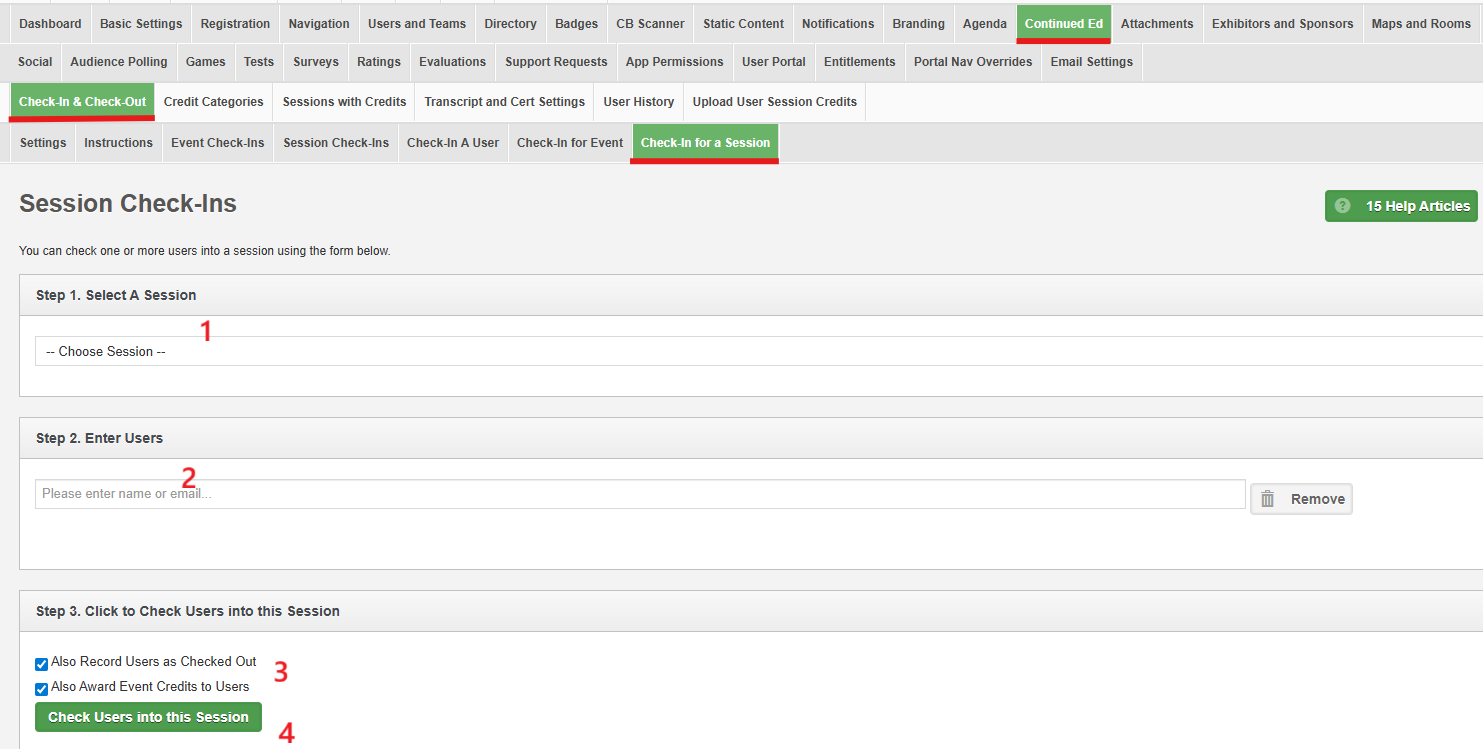
- Select the session from the drop-down menu
- Start typing in the user name and select it from the list
- Select if you also want to record the check out and/or event credits
- Click on the "check users into this session" button to save.
Related Articles
Troubleshooting: An attendee scanned into the wrong session
If an attendee scans into the wrong session or the wrong session was selected in the CBS (ConferenceBeat Scanner) app, please complete the following steps: 1. Go to Continued Ed > Check in & Check out > Session Check ins in the admin portal Search ...ConferenceBeat Scanner (CBS) Portal Reporting - Attendance/CEU tracking
Attendance/CEU Scanning Reports In the admin portal, go to CB Scanner > Attendance Summary: The summary screen will show users who have been scanned into a session or event. This will display 1 entry per person even if they were scanned multiple ...ConferenceBeat Scanning (CBS) - Attendance/CEU tracking Settings
Attendance/CEU Tracking Portal Settings: To set/update the settings that will be utilized in the CBS app go to CB Scanner > Attendance > Settings in the admin portal. Automatically process scans: select "yes" to process scans in real time. Select ...ConferenceBeat Scanner (CBS) - instructions for attendance/CEU tracking
CB Scanner – Session/Event Scanning Instructions Important note: permissions to access the app must first be established in the CB Menu Builder. Please see the help video "CB Scanner Menu Builder Instructional Video " for more information Step 1: ...ConferenceBeat Scanner (CBS) - Attendance/CEU scanning introductory video
This video demonstrates an overview of using the CBS app for attendance scanning. For more detailed instructions on setting up and using the app, please see the Menu Builder article or CBS scanning instruction article