Troubleshooting: I am trying to change sessions or check in/out but I can't access the menu
If you are unable to access the menu items while scanning into sessions or the event, you are most likely in Kiosk Mode.
Kiosk Mode locks down the app for self service scanning. If you are in kiosk mode, it will look like the image below.
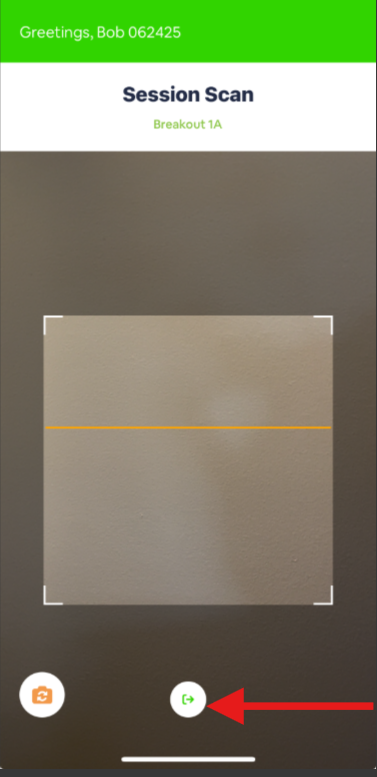
You will notice that none of the settings, sessions or home screen can be accessed from this mode. Therefore, to change sessions, you must use either the "kiosk admin" controls or exit the Kiosk.
- Click on the exit button shown in the image above (red arrow)
- Enter your log in credentials or scan the log in QR code (note: this method requires onsite badge printing).

Note: only the user who logged in can exit the device or any event admin.
This will take you back to the event page where you can select your event and/or session.
Related Articles
ConferenceBeat Scanning (CBS) - Attendance/CEU tracking Settings
Attendance/CEU Tracking Portal Settings: To set/update the settings that will be utilized in the CBS app go to CB Scanner > Attendance > Settings in the admin portal. Automatically process scans: select "yes" to process scans in real time. Select ...ConferenceBeat Scanner (CBS) - instructions for attendance/CEU tracking
CB Scanner – Session/Event Scanning Instructions Important note: permissions to access the app must first be established in the CB Menu Builder. Please see the help video "CB Scanner Menu Builder Instructional Video " for more information Step 1: ...CB Scanner Menu Builder Instructional Video
This video explains how to set up the ConferenceBeat Scanning (CBS) app icons and permissions for both Lead Retrieval and Attendance/CEU scanning. Note: This must be completed prior to downloading and using the CBS app. To access the Menu Builder go ...ConferenceBeat Scanner (CBS) - Attendance/CEU scanning introductory video
This video demonstrates an overview of using the CBS app for attendance scanning. For more detailed instructions on setting up and using the app, please see the Menu Builder article or CBS scanning instruction articleTroubleshooting: I scanned a user but the check in is not showing in the portal/app
Here are the most common reasons a scan (check in/out) would not showing in the portal or app. 1. They scanned into overlapping sessions The setting in the portal under Continued Ed > Check in & Check out defaults to "prevent overlapping sessions" If ...